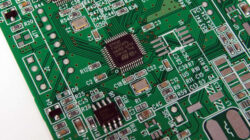
Unbeatable ARM Cortex-M4 board for any purpose

A good prototyping board with many features can save a day. As there are all you need you can instantly focus on things you need it to do. Aithon Robotics LLC wanted to make powerful but yet simple to work with ARM board which would fit most needs – especially in robotics. First of all it is based on ARM Cortex-M4 STM32F407 that features FPU. 512KB Flash and 192KB of RAM can be enough for most of applications. We don’t need to name all the features of ARM controller which actually caries lots of them.

ARM Cortex-M4 board

The board itself has 15GPIOs that are running at 3.3V but are 5V tolerant. It has 8 ADC inputs and 8 PWM outputs where you can attache servos. You can see mini-USB seen as device and USB host ports, xBee socket, Bluetooth compatible header, SPI, SWD, DAC, microSD. Robotics enthusiasts will find a 3-axis accelerometer (LSM330DLC), 2 channel 5A H-bridge, alphanumeric LCD header, buzzer, couple push buttons and couple programmable LEDs. Besides great hardware there is software library available which is based on ChibiOS/RT. So it means all is opensource and free to use and modify. If you are looking for versatile prototyping board it may be great choice.

Read|Permalink Comments(0)

ARM Cortex-M4 whistle detector

I remember when I was a kid, I had key finder – small device where you would whistle and it would respond by beeping. I don’t know how complex it was, but it worked. Probably simple sound activated circuit with bandpass filter and that’s it. If you would like it to recognize whistle patterns, then there is a different talk. Without FFT and signal processing it would be hard to achieve. Limpkin had ARM Cortex-M4 in his hands and wanted to build something interesting. So he came up whistler.

As we know Cortex-M4 has DPS instruction set built in which allows pretty efficient signal processing. As he found out it could perform around 80 2048-point FFTs and still have resources to run custom algorithms. First step was to capture signal and transform in to frequency domain using FFT. Second step was to interpret them. It took quite a lot trial and error runs until it got polished. The whistler is assembled on slim PCB with microphone and preamplifier, power regulator, MCU and MOSFET to switch or dim big loads. Algorithm is capable of detecting number of peaks, peak width, deviation on one peak and more giving big flexibility to improvise.

Read|Permalink Comments(0)

Generating rainbow colors with Arduino

Sometimes RGB model doesn’t work well when you want to express specific color patterns. For instance if you want to cycle through colors more naturally like rainbow, Hue, Saturation and Brightness works better. Using those HSB channels, color control is more natural as we used to see. Of course there is no problem to convert from one model to another because hardware is designed to be RGB. For instance RGB LED.

Arduino color library

LucidTronix have prepared an Arduino library that allows controlling colors using Hue, Saturation and Brightness model. This way it is easy to manipulate colors and do some funky stuff like this RGB rainbow. This library works well with both models – HSB and RGB. You can convert from one to another and manipulate either way.

Read|Permalink Comments(0)

Simply print firmware in to microcontroller

This sounds crazy at first glance, but when you start looking at this, it sounds obvious and logical way. Dean Camera, who is creator of famous LUFA project decided to refresh his enthusiasm to developing by making bootloader based on printing. The idea of this is to flash AVR microcontroller by simply printing hex file like you would print it on paper.

flash AVR by printing

The trick was to write a bootloader which would be seen as USB printer device. So PC using standard drivers would accept it. Luckily windows already comes with “generic Text-Only” printer driver which deals nicely with text files. All is left is to print hex file to device. Bootloader runs Intel HEX parser which takes data to be written to flash memory. From one side this seems to be funny approach, but in other hand it can be really practical way. Drivers are all there and no special hardware is needed. Why not?

Read|Permalink Comments(0)

« Previous PageNext Page »