Wake up with sun anywhere you are

Direct sunlight is perfect for waking up in the morning. But it happens that there is no sun or simply your bedroom is in western side of the house. Then there is the only way – start cheating with sun simulator. It is based on ATTiny13 microcontroller which takes care of dimming the 150W halogen lamp.

Alarm clock can be set to reach its maximum intensity from 2 minutes up to 8 hours. Microcontroller takes alarm signals from regular digital radio alarm clock so no need to do additional time tracking. I agree it looks a bit dangerous to have halogen lamp near pillow, but it is worth to risk for a bit of sun.

Read

The Outstanding Arduino Strobe Algae Bioreactor

We all knew that Arduino is definitely a very special electronic device, as you can do many incredible electronic projects with a simple arduino!

Well, if you’re looking for a home décor, but you don’t want to spend huge money out from your wallet, maybe this fantastic Arduino Strobe Algae Bioreactor is your ideal choice.

Why?

Believe it or not, the Arduino Strobe Algae Bioreactor is only cost you about $60 and less than three hours to accomplish it! Honestly, you don’t need to be an expert to build this project, as it only require basic power tools.

Arduino-Strobe-Algae-Bioreactor

For your information, algae has been recognized as one of the most potential environmental friendly powers, where many researchers have been involved in the algae experiment to cultivate the unknown parts of algae.

In this project, it’s a very easy one, where you use a platform for one technique that is broadly used with to trick the algae into reproducing. The algae species reacts differently in many ways to its environment.

You can create a microcontroller platform that can be variably set and allows for easy configuration to any bioreactor. Furthermore, the LEDs can be easily swapped out to experiment with different colors and even UV for some hydrogen producing species.

In overall, the Arduino Strobe Algae Bioreactor could be the finest home décor inside your home and impress the guests!

Read

Der Kapellmeister – Direct Musical Performance through Only Visible Gestures

Have you ever thought that is it possible to direct musical performance by only moving your hands in the air without even get in touch with the musical instrument? Well, it might be sounded crazy, but believe it or not, you can really do it with Der Kapellmeister!

For your information, the project is implemented with a glove. Then, it resembles with a conducting baton that has the ability to analyze visible gestures and interprets them into musical elements.

Der Kapellmeister

Der Kapellmeister is a very simple device that can be used to test a user’s ability in basic conducting, by using a real conducting baton. Let’s take an example. When a user performs a gesture, the device is automatically display the tempo, time signature and beat number on the LCD screen. It will then output a tick sound through the speaker.

The system can analyze up to four different time signatures at one time! Honestly, Der Kapellmeister is a very suitable device, especially for the beginners of conducting.

Der Kapellmeister is a compact mobile set that consist of a baton and a glove. Furthermore, an accelerometer is attached to the user’s middle finger, while the microcontroller, LCD and speaker are stitched to the wrist area of the glove.

Read

How to Interface a Microcontroller with a PS/2 Keyboard

In most of the case, it’s highly important when you’re moving from basic microcontroller programming to advanced microcontroller programming, especially if you wants to interrupt the code.

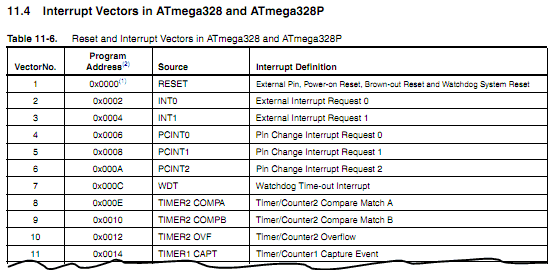
Technically, interrupts are pieces of code that much likes functions. The interrupts are executed automatically when outside events occur. People always used the interrupts to react to all sorts of outside inputs; including pin changes that driven by outside devices.

By using the interrupts, it enables the users to give the code an ability to react to events as they happen. In this case, we don’t have to wait for the code to get to a place where it can handle an event.

For your information, the project uses interrupts to interface a PS/2 keyboard with the USB NerdKit. To be honest, the simplicity of the protocol and the asynchronous nature of the clock generated by the keyboard make it a great start, especially for the amateur to get familiar with interrupts and interrupt handlers.

The PS/2 keyboard is quite cheap and very easy to obtain, at the garage sales, online auction or electronic stores. By the way, if you don’t want to chop your PS/2 keyboard, you might consider to get an extension cable for a PS/2 keyboard.

Read

The Superb Crystal Real Time Clock

You might probably involve with Crystal Real Time Clock development project before, but have you ever done it with the system interrupts?

If you don’t know what the system interrupts for, it’s a process that stops a microprocessor/microcontroller from what it is doing. By doing this step, it will enable you to do other task instead of the previous one. Please allow me to give you an example here. Let’s say that the main program is running and performing some function in a circuit, suddenly an interrupt applying into the program. It caused the program halted immediately. In the same time, another routine is carried out. When the routine had finished, the processor goes back to main routine again! Sounds simple, isn’t it?

crystal-real-time-clock

For this project, you’ll have to use the USB NerdKits, which is already included a 14.7456MHz crystal. The main purpose of this feature is to clock each instruction that microcontroller executes. Meanwhile, we still can use the same crystal to keep track of “wall time”, either it’s measured in seconds, minutes, hours, days and so on.

Well, although it might sounds a little bit hard to develop this Crystal Real Time Clock, but it’s almost the same as the other, except it’s involving the system interrupt! So, let’s go and build it right now…

Read

Next Page »